Understanding mark certificates
Mark certificates enable organizations to display trademarked or brand logos in recipients' inboxes, in accordance with Brand Indicators for Message Identification (BIMI) standards, boosting sender legitimacy and email engagement.
| For more information about BIMI standards, see All about BIMI. |
SCM supports the following mark certificates:
-
Verified Mark Certificates (VMCs) — VMCs allow organizations to display their officially trademarked logos alongside authenticated emails in inboxes. They require a registered trademark and a strict Domain-based Message Authentication, Reporting, and Conformance (DMARC) policy.
For more information about the DMARC protocol, see DMARC Overview. -
Common Mark Certificates (CMCs) — CMCs serve the same purpose as VMCs but do not require a registered trademark. Instead, they require proof of consistent logo use for at least one year and adherence to a strict DMARC policy.
In addition to providing a centralized view of mark certificates and certificate details, SCM enables appropriately privileged administrators to do the following:
-
Manage certificate lifecycles — Request and revoke mark certificates.
-
Manage certificate requests — Approve, decline, and edit mark certificate requests.
-
Download certificates — Download mark certificates in various formats.
Mark certificates can be managed on the page.
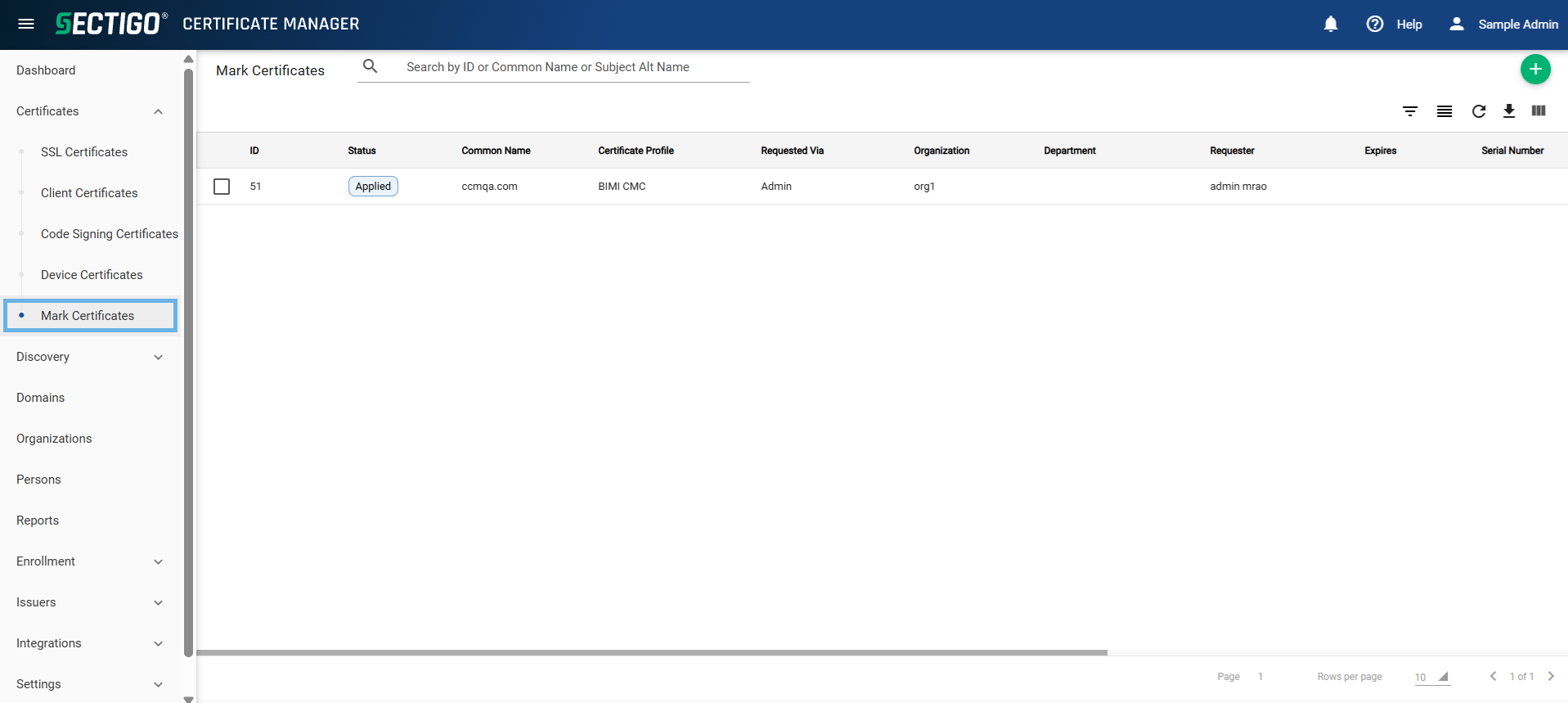
The following table describes the details and controls of the Mark Certificates page.
| Column | Description |
|---|---|
ID |
The unique numeric identifier of the certificate. |
Status |
The status of the certificate. The possible values are:
|
Common name |
The domain name used in the mark certificate request. This refers to the common name in the certificate itself. |
Order number |
The unique identifier created by the issuing CA to represent the certificate request. |
Certificate profile |
The certificate profile used for the certificate request. |
Verification type |
The verification type used when requesting the certificate. The possible values are:
|
Term |
The validity period of the certificate. |
Requested via |
The method used to request the certificate or to bring it into SCM. The possible values are:
|
Organization |
The organization that requested or has been issued the certificate. |
Department |
The department, if any, that requested or has been issued the certificate. |
Requester |
The email address of the end-user, or the name of the administrator who requested the certificate. |
Approver |
The name of the administrator who approved the certificate request. |
Subject |
The entity (such as a domain, organization, individual, or device) identified by the certificate, containing unique attributes that distinguish it from others. |
City |
The city where the associated organization or department is located. |
State |
The state or province where the associated organization or department is located. |
Country |
The country where the associated organization or department is located. |
Subject alt name |
Additional names or attributes that identify the entity associated with the certificate. These can include alternative domain names, email addresses, IP addresses, or other identifiers relevant to SSL certificates. |
Issuer |
The name of the certificate-issuing CA. |
Expires |
The date that the certificate expires. |
Serial number |
A unique serial number assigned to the certificate. |
Key usage |
The cryptographic operations that the certificate is valid for. |
Extended key usage |
Additional cryptographic operations that the certificate is valid for. |
Key algorithm |
The algorithm used to generate the key pair. |
Key size / curve |
The size of the key pair or the curve used to generate the key pair. |
Signature algorithm |
The algorithm used to sign the certificate. |
MD5 hash |
The MD5 hash (thumbprint/fingerprint) of the certificate. |
SHA1 hash |
The SHA1 hash (thumbprint/fingerprint) of the certificate. |
Comments |
Comments or notes about the certificate. |
Requested |
The date that the certificate was requested. |
Approved |
The date that the certificate was approved. |
Declined |
The date that the certificate request was declined. |
Issued |
The date that the certificate was issued. |
Downloaded |
The date that the certificate was downloaded. |
Revoked |
The date that the certificate was revoked. |
Table controls |
|
Quick Search |
Enables you to quickly search the results by ID, Common Name, or Subject Alternative Name. |
Filter |
Enables you to sort the table information using custom filters. |
Group |
Enables you to sort the table information using predefined groups. |
Refresh |
Refreshes the information presented in the table. |
Download CSV |
Downloads the table information as a |
Manage Columns |
Enables you to select which table columns to display. |
Admin controls |
|
Add |
Opens the Request Mark Certificate dialog where you can request a new certificate. |
Edit |
Opens the Edit Mark Certificate dialog where you can edit the details of the certificate request. |
View |
Opens the Mark Certificate page where you can view certificate details and perform various administrative tasks (such as, resending collection emails or downloading the certificate). |
Approve |
Opens the Approve Message dialog where you can approve the certificate request. |
Decline |
Opens the Decline Message dialog where you can decline the certificate request. |
Revoke |
Opens the Revocation Reason dialog where you can revoke the certificate. |
View Audit |
Opens the Certificate Audit page where you can view or download audit logs. |
Enrollment methods
SCM supports the enrollment of Mark certificates using the following methods:
-
Enrollment Wizard — Enroll Mark certificates through the SCM enrollment wizard. For more information, see Enroll a Mark certificate in SCM.
-
Admin API — Enroll Mark certificates through the SCM Admin API using a configured SCM API Admin. For more information, see Understanding administrators.