Understanding Vulnerability Scan
The Vulnerability Scan tool detects vulnerable plugins, themes, Cross-Site-Scripting (XSS) and SQL injection vulnerabilities in your website.
-
Automated scanning — Regularly scans to identify vulnerabilities on your website.
-
Comprehensive reporting — Provides detailed reports including insights into identified vulnerabilities, their severity, and recommended remediation steps.
-
Severity-based risk scoring — Assigns a severity level to each vulnerability to help prioritize remediation efforts.
The results of the scan are displayed on the Vulnerability Scan page.
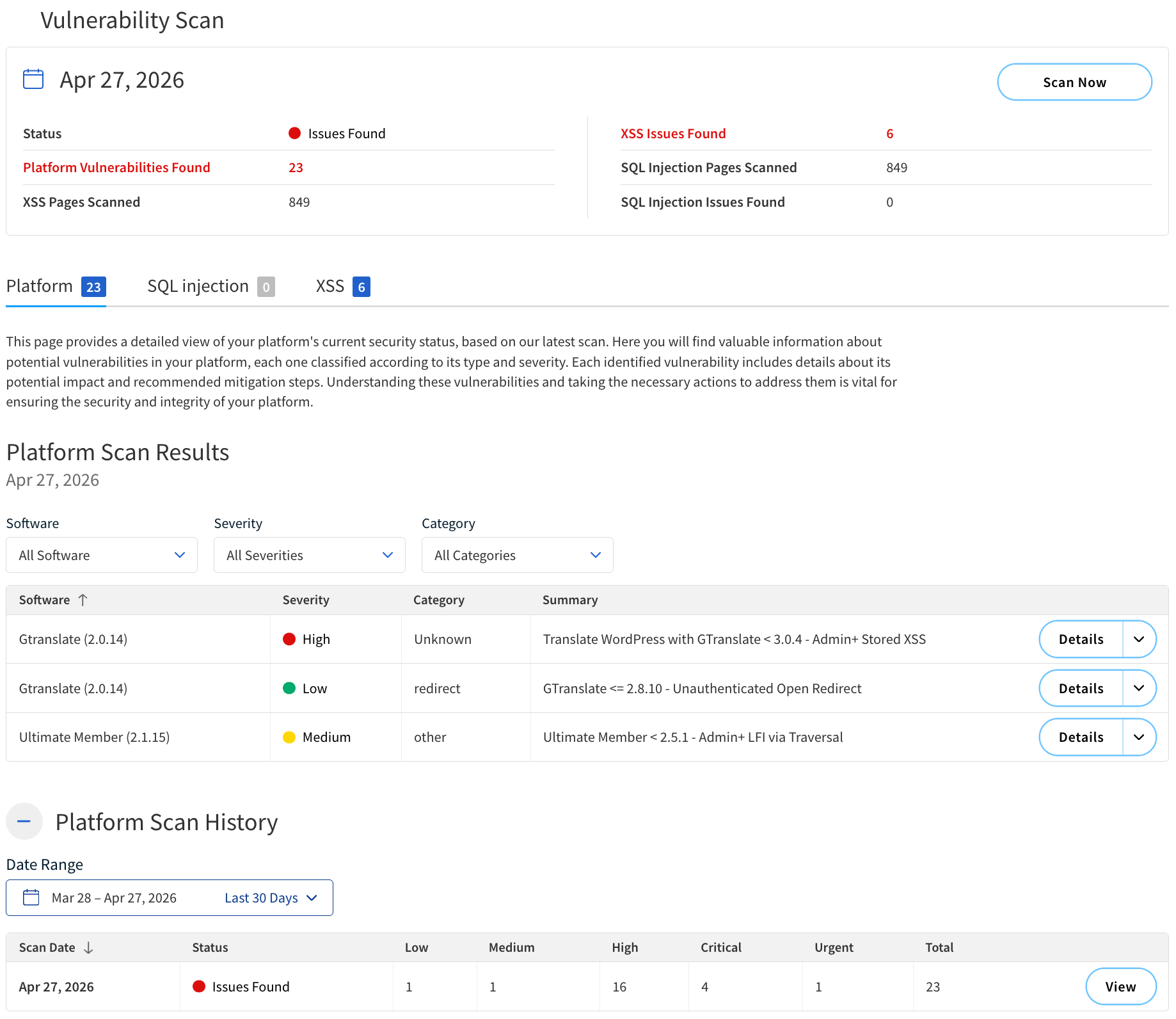
Report summary
The summary of the scan results is displayed at the top of the Vulnerability Scan page.
The following table describes the components of the summary.
| Component | Description |
|---|---|
Scan Time |
The date and time when the scan was performed. |
Status |
The overall status of the scan. Possible statuses include:
|
Platform vulnerabilities found |
The total number of platform vulnerabilities detected. |
XSS pages scanned |
The number of pages scanned for Cross-Site Scripting (XSS) vulnerabilities. |
XSS issues found |
The total number of XSS vulnerabilities detected. |
SQL injection pages scanned |
The number of pages scanned for SQL injection vulnerabilities. |
SQL injection issues found |
The total number of SQL injection vulnerabilities detected. |
Actions |
|
Scan Now |
Start a new scan. |
Platform Scan Results
Platform Scan Results provides detailed information about the vulnerabilities detected on the platform, each one classified according to its type and severity.
Each identified vulnerability includes details about its potential impact and recommended mitigation steps.
The following table describes the components of Platform Scan Results.
| Component | Description |
|---|---|
Software |
The name of the CMS software or plugin where the vulnerability was found. |
Severity |
The severity level of the vulnerability. Possible severity levels include:
|
Category |
The type of the vulnerability detected (for example, XSS, SQL injection). If no category is assigned, it will display as |
Summary |
A brief description of the vulnerability. |
Actions |
|
Details |
Expand the row to view more detailed information about the vulnerability. The following details are provided:
|
Filter by software |
Filter vulnerabilities by the affected CMS or plugin name. |
Filter by severity |
Filter the vulnerabilities based on their severity level. |
Filter by category |
Filter the vulnerabilities based on their category. |
SQL Injection Scan Results
SQL Injection Scan Results provides a list of URLs that are potentially susceptible to SQL injection attacks.
The following table describes the components of SQL Injection Scan Results.
| Column | Description |
|---|---|
URL |
The specific URL on your website that is vulnerable to SQL injection attacks. |
Status |
The current status of the vulnerability. The possible statuses include:
|
Actions |
|
Search bar |
Search for specific URLs within the scan results. |
Filter by status |
Filter the URLs based on their vulnerability status. |
Export CSV |
Download the SQL injection scan results as a CSV file. |
XSS Scan Results
XSS Scan Results provides a list of URLs that have been tested for XSS vulnerabilities.
The following table describes the components in XSS Scan Results.
| Component | Description |
|---|---|
URL |
The specific URL on your website that was tested for XSS vulnerabilities. |
Status |
The current status of the vulnerability. The possible statuses include:
|
Actions |
|
Search bar |
Search for specific URLs within the scan results. |
Filter by status |
Filter the URLs based on their vulnerability status. |
Export CSV |
Download the XSS scan results as a .csv file. |
Details |
Expand the row and view a description of the detected XSS vulnerability, including information about the risk and recommended remediation steps. |
Platform Scan History
Platform Scan History displays a log of previous platform vulnerability scans.
The following table describes the components of the Platform Scan History section.
| Column | Description |
|---|---|
Scan Date |
The date and time when the platform vulnerability scan was performed. |
Vulnerabilities Found |
The total number of vulnerabilities detected. |
Status |
The overall status of the scan. Possible statuses include:
|
Low |
The number of low-severity vulnerabilities found. |
Medium |
The number of medium-severity vulnerabilities found. |
High |
The number of high-severity vulnerabilities found. |
Critical |
The number of critical-severity vulnerabilities found. |
Urgent |
The number of urgent-severity vulnerabilities found. |
Total |
The total number of vulnerabilities found. |
Actions |
|
Details |
View results of a previous platform vulnerability scan. |