Understanding Firewall & CDN
The Firewall & CDN service consists of two components that work together to enhance the security and performance of your website:
-
Web Application Firewall (WAF) — Filters and blocks malicious traffic before it reaches your web server.
-
Content Delivery Network (CDN) — Distributes website content across multiple global locations so visitors can access it from the server closest to them.
The Firewall & CDN page in the SiteLock dashboard provides a summary of overall site traffic, identified threats, and performance activity.
Summary tab
The Summary tab in the Firewall & CDN page in your SiteLock dashboard provides a wide variety of data related to traffic to the site and threats found.
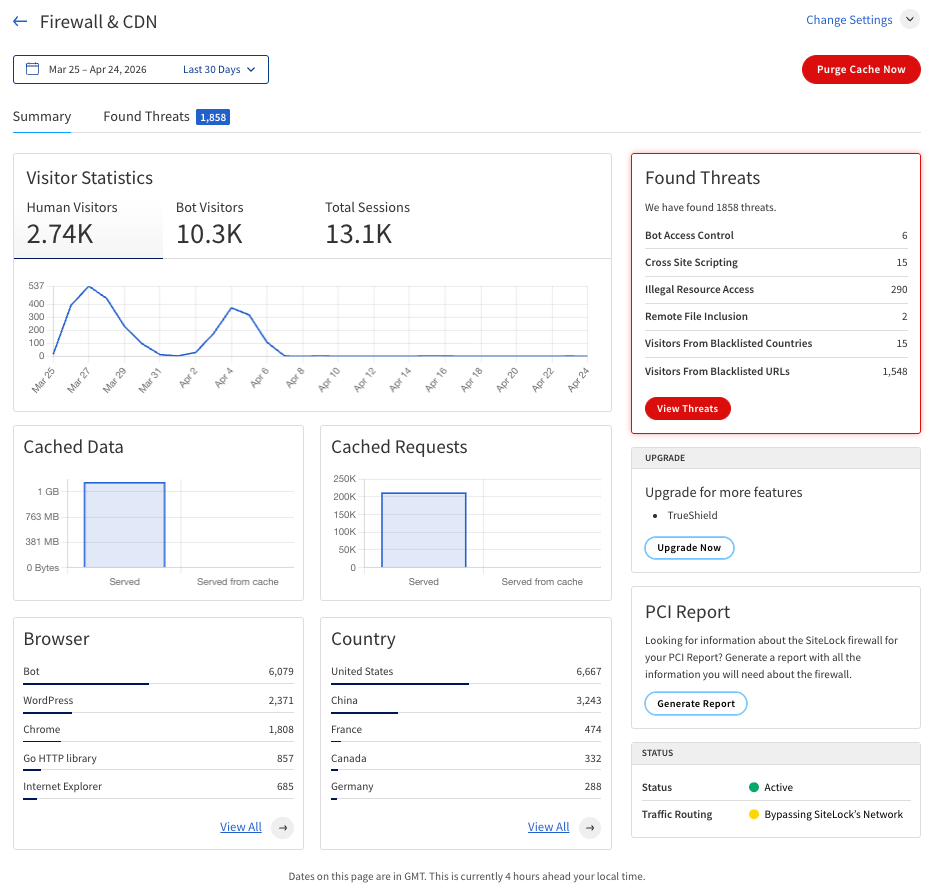
The following table describes the information provided in the Summary tab.
| Name | Description | ||
|---|---|---|---|
Visitor Statistics |
The number of visitors to your website during a specified time period. The visitors are classified into the following categories:
|
||
Cached Data |
The total bytes of both regular and cached data delivered via the CDN during the specified time period. |
||
Cached Requests |
The total number of requests served, either regularly or from the cache, through the CDN during the specified time period. |
||
Browser |
Browsers detected accessing the website. Click View All to see the full list of browsers. |
||
Country |
Countries from which the website traffic originates. Click View All to see the full list of countries.
|
||
Found Threats |
The number and types of threats detected and blocked. This panel appears only when the firewall detects threats. Click View Threats to take further action. |
||
Upgrade |
Information on possible upgrades to your current subscription that would allow you to access additional features and services. |
||
Status |
The status of the Firewall & CDN components. The following components are listed:
|
||
PCI Report |
If your subscription includes PCI compliance reporting, clicking Generate Report will create PCI DSS compliance report that can be downloaded and submitted to your acquiring bank or payment processor as part of your PCI compliance requirements. |
||
Actions |
|||
Change Settings |
Access various settings to manage your Firewall & CDN service. The following settings can be accessed through this menu:
|
||
Purge Cache Now |
Clear the CDN cache for your website, forcing all content to be re-fetched from your origin server on the next request. |
||
View Threats |
Access the Found Threats tab to view details about the threats detected by the firewall, including options for managing these threats. |
||
Date Range Filter |
Filter the data displayed in the Summary tab by selecting a specific date range. |
||
Found Threats tab
The Found Threats tab in the Firewall & CDN page in your SiteLock dashboard provides detailed information about the threats detected by the firewall, including options for managing these threats.
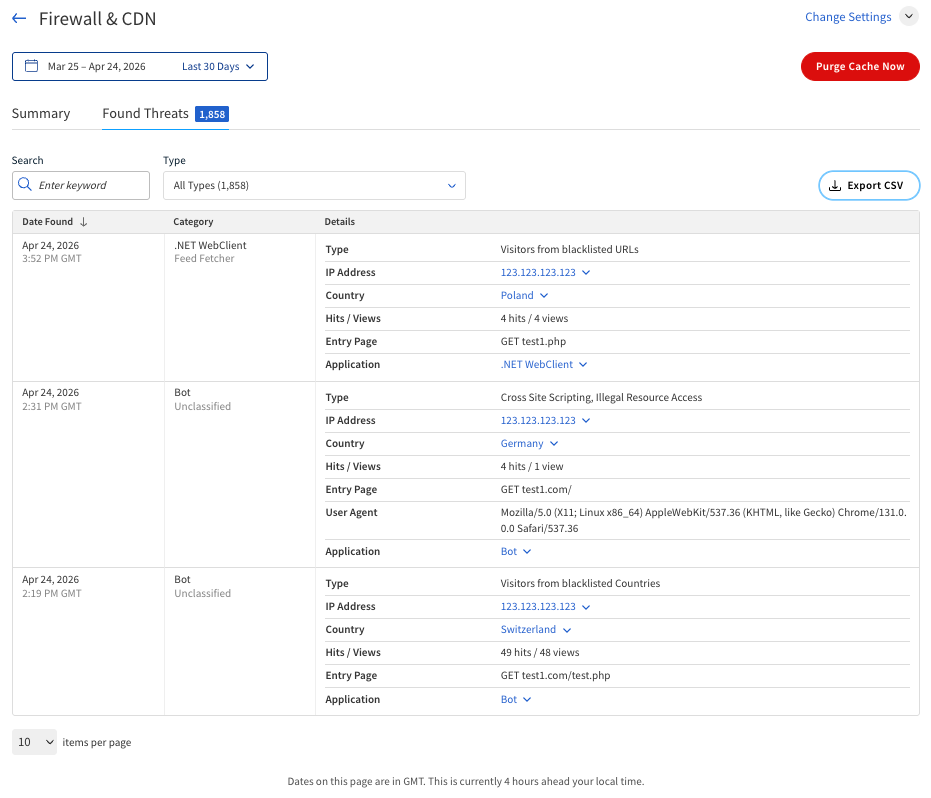
The following table describes the information that may be present on the Found Threats tab.
| Name | Description |
|---|---|
Date Found |
The date and time when the threat was detected by the firewall. |
Category |
The category of the user agent associated with the threat. |
Type |
The type of threat detected. The following are examples of threat types that may be detected by the firewall:
|
IP Address |
The IP address from which the threat originated. Clicking the IP address will open a menu with the following options:
|
Country |
The country from which the threat originated. Clicking the country name will open a menu with the following options:
|
Hits/Views |
The number of times this specific threat was detected by the firewall and the number of times it was viewed in the dashboard. For example, |
Entry Page |
The page on your website the threat attempted to access. |
User Agent |
The user agent string associated with the threat. |
Application |
The application or service that the threat attempted to access on your website. Clicking on the application name will open a menu with the following options:
|
Actions |
|
Search bar |
Search for specific threats by entering keywords or criteria. |
Type filter |
Filter the displayed threats by type. |
Export CSV |
Download the data from the Found Threats tab in a CSV file for further analysis or record-keeping. |
Date Range Filter |
Filter the threats displayed in the table by selecting a specific date range. |
Purge Cache Now |
Clear the CDN cache for your website. |
Change Settings |
Access settings to manage the Firewall and CDN service. |