Understanding messages
Messages are notifications regarding the SiteLock account and its associated websites. These notifications may include service updates, alerts, and other relevant information.
Message access is determined by how many websites are associated with the account:
-
Accounts hosting multiple websites — Notifications for all websites are available on the Messages page. Notifications specific to an individual website can be viewed in that site’s Messages tab within the comprehensive site view.
-
Accounts hosting a single website — A separate Messages page is not available. All notifications for the website appear directly in the site’s Messages tab within the comprehensive site view.
Messages table
Messages are displayed in a table format within the Messages page and the Messages tab.
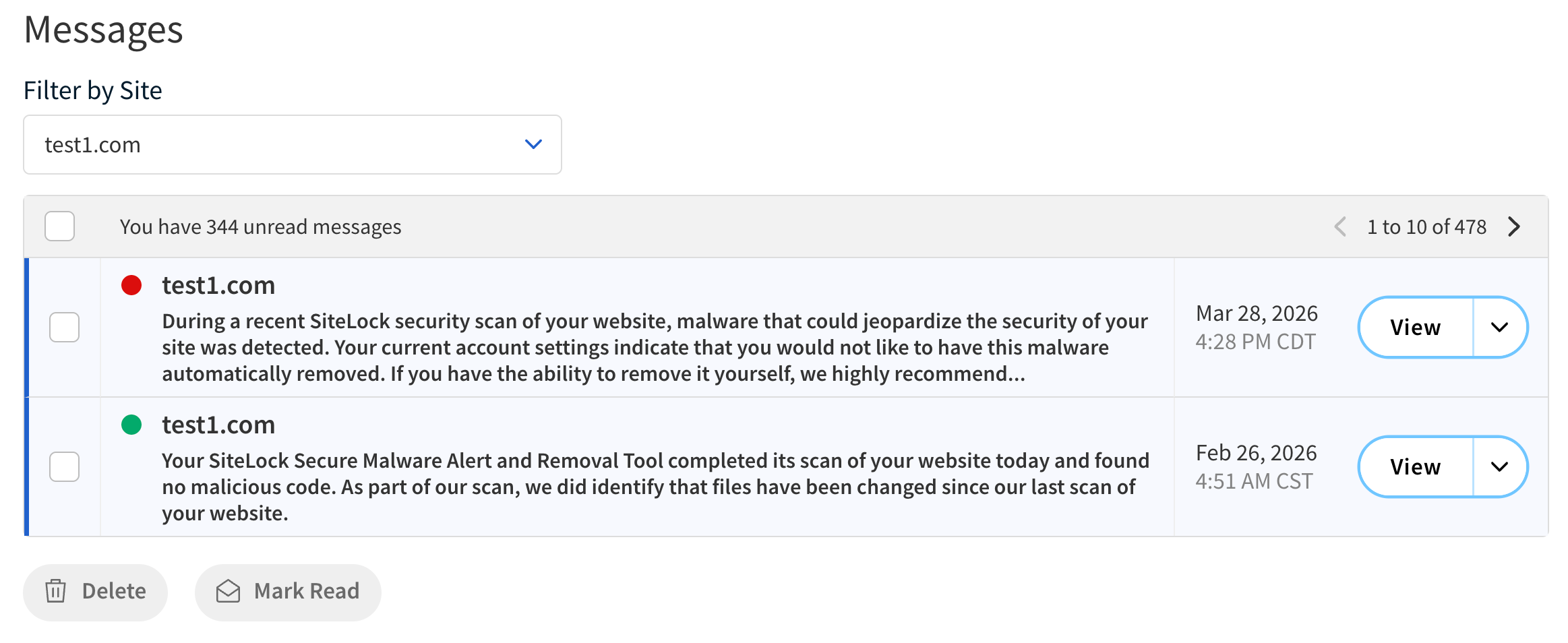
The following table describes the components of the Messages table.
| Field | Description | ||
|---|---|---|---|
Message content |
Displays the message preview under the website name. |
||
Date |
Displays the date the message was sent. |
||
Actions |
|||
Filter by Site |
Filter messages by site.
|
||
View |
View the full message content in a pop-up window. |
||
Drop-down menu |
Use the menu to access additional options. The following options are available:
|
||
Delete |
Use the checkbox to select messages for deletion. |
||
Mark Read |
Use the checkbox to select messages to mark as read. |
||
Message pop-up window
When you click View from the Messages table, a pop-up window appears displaying the full content of the selected message.
The following table describes the components of the message pop-up window.
| Field | Description |
|---|---|
Website name |
Displays the name of the related website. |
Date and time |
Displays the date and time the message was sent. |
Message content |
Displays the full content of the selected message. |
Actions |
|
Back to List |
Returns to the Messages table. |
View Site |
Opens the comprehensive site view for the related website. |
Delete |
Deletes the message. |
Previous and next arrows |
Navigate to the previous or next message in the list. |
| Regularly check your messages to stay informed about important account updates and site notifications. |