Understanding SSL Monitor
The SSL Monitor tool helps manage and monitor the SSL certificates for your website, ensuring secure communication between your server and visitors.
-
Certificate health — Shows the current status of your SSL certificates.
-
Automated monitoring — Regularly checks the validity and expiration dates of the SSL certificates.
-
Issue alerts — Notifies you of issues with your SSL certificates, such as expiration or misconfiguration.
The SSL Monitor service can be enabled for certificates provided through SiteLock’s Firewall & CDN service or for certificates obtained from third-party providers.
Certificates not provided through Firewall & CDN
SSL certificates not provided through the Firewall & CDN can be configured, managed, and monitored using the SSL Monitor page.
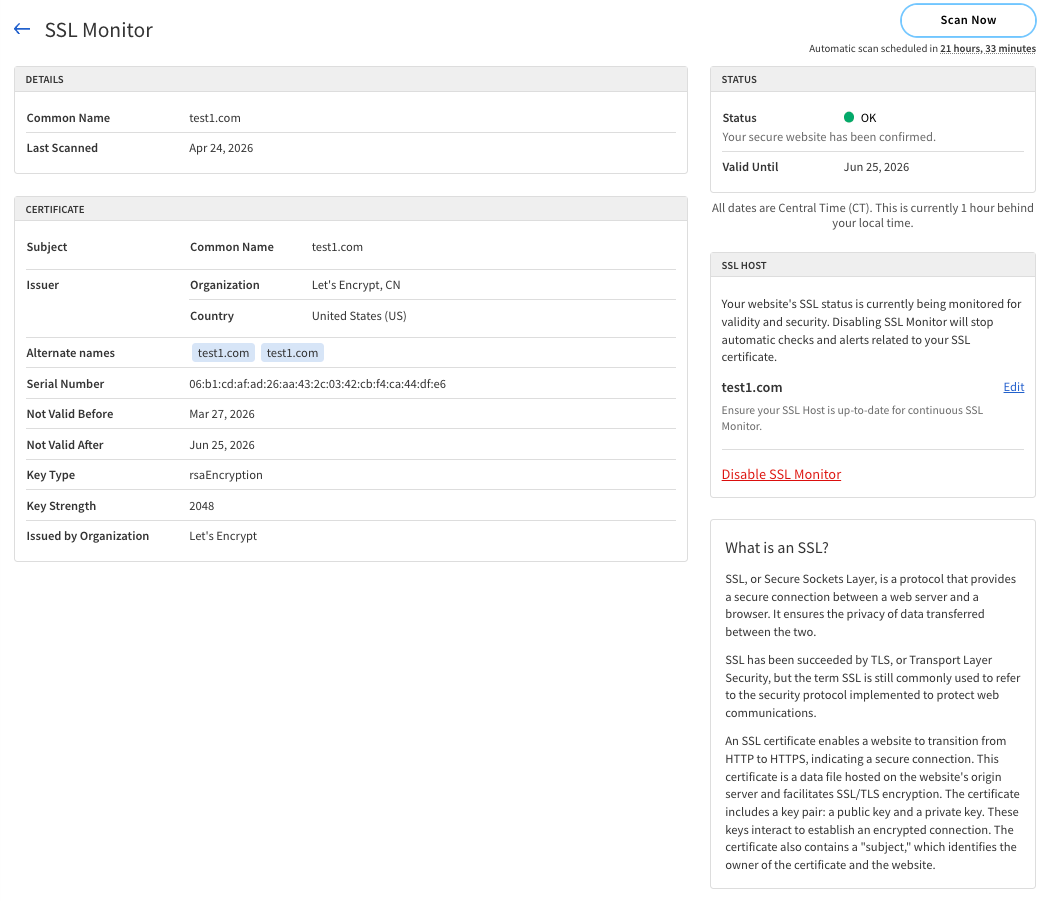
Details
The Details panel provides information about each SSL certificate monitored for your website.
The following table describes the components of the Details panel.
| Component | Description |
|---|---|
Common Name |
The domain name associated with the SSL certificate. |
Last Scanned |
The date and time when the certificate was last scanned. |
Certificate
The Certificate panel provides detailed information about the SSL certificates for your website.
The following table describes the components of the Certificate panel.
| Component | Description |
|---|---|
Subject |
The entity to which the certificate is issued. |
Issuer |
|
Alternate names |
Other domain names covered by the certificate. |
Serial Number |
A unique identifier assigned to the certificate by the issuer. |
Not Valid Before |
The date and time when the certificate becomes valid. |
Not Valid After |
The date and time when the certificate expires. |
Key Type |
The type of cryptographic key used in the certificate (for example, RSA, ECC). |
Key Strength |
The strength of the cryptographic key, typically measured in bits (for example, 2048 bits). |
Issued by Organization |
The organization that issued the certificate. |
Status
Status indicates the current state of the SSL certificate for your website.
The following table describes the components of the Status panel.
| Component | Description |
|---|---|
Status |
The current status of the SSL certificate. The possible statuses include:
|
Valid Until |
The expiration date of the SSL certificate. |
SSL Host
SSL Host displays the hostname associated with the SSL certificate for your website.
The following table describes the components of the SSL Host section.
| Component | Description |
|---|---|
SSL Host |
The hostname for which the SSL certificate is issued. |
Actions |
|
Edit |
Modify the SSL Host settings. |
Disable SSL Monitor |
Turn off SSL monitoring for the website. |
Certificates provided through Firewall & CDN
SSL certificates provided through the Firewall & CDN are automatically configured and managed.
You can monitor their status using the SSL Monitor page.

The following table describes the components of the SSL Monitor page for certificates provided through the Firewall & CDN.
| Component | Description |
|---|---|
Status |
The current status of the SSL certificate. The possible statuses include:
|
Valid Until |
The expiration date of the SSL certificate. |
SSL Host |
The hostname for which the SSL certificate is issued. |