Understanding SMART File Scan
The SMART File Scan tool detects and removes malware from a website’s filesystem for sites that support SFTP, FTP, or FTPS connections.
-
Comprehensive scanning — Scans all website files, including core files, themes, plugins, and custom files.
-
Automatic remediation — Cleans detected malware during the scan.
-
Detailed reporting — Provides detailed scan reports, including information on infected files, cleaned files, and suspicious files.
-
Scan history — Maintains a record of all previous scans for reference.
The results of the scan are displayed on the SMART File Scan page.
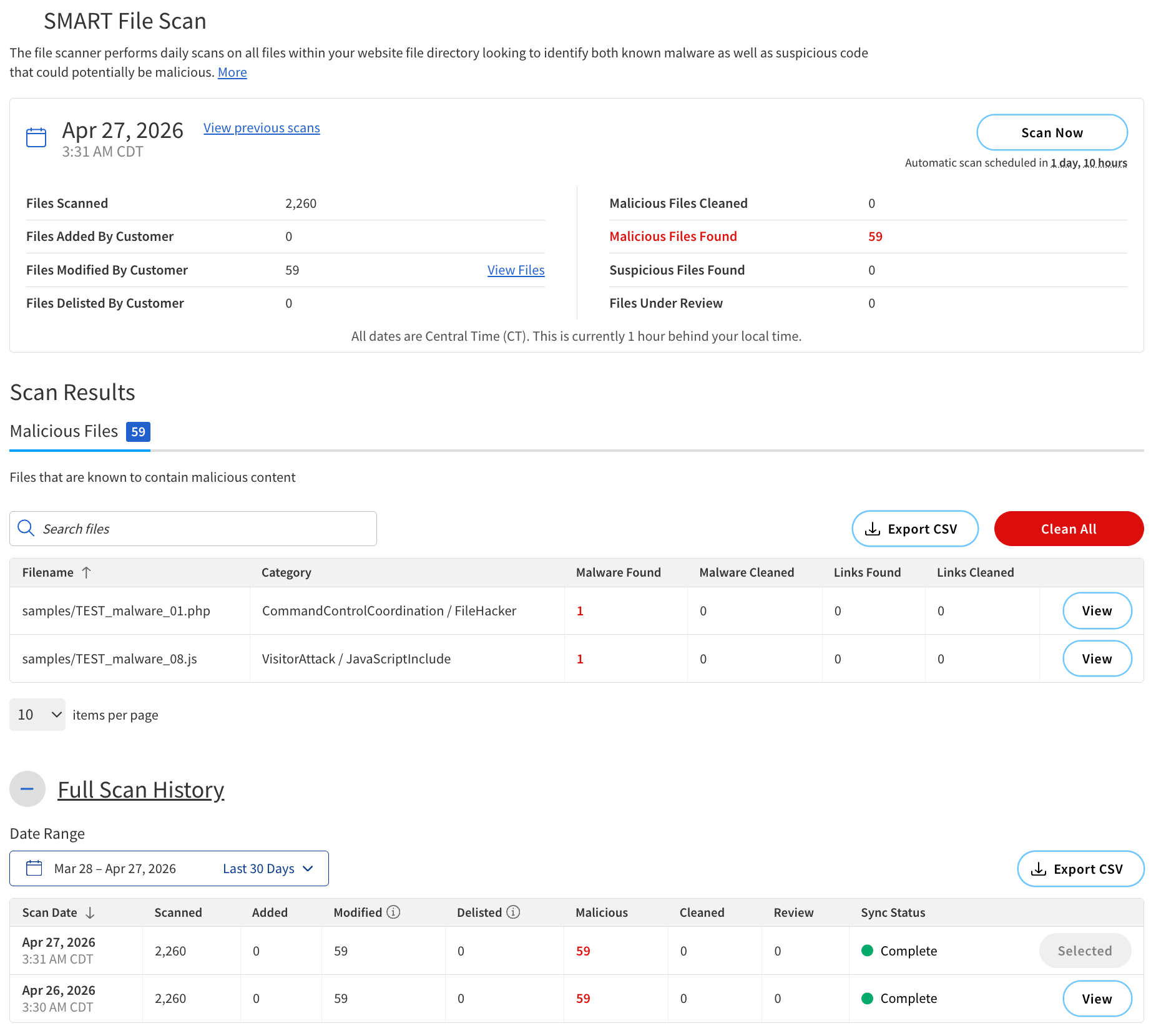
Report summary
The summary of the scan results is displayed at the top of the SMART File Scan page.
The following table describes the components of the summary.
| Component | Description |
|---|---|
Scan Time |
The date and time when the scan was performed. |
Files Scanned |
The total number of files that were scanned during the scan. |
Files Added by Customer |
The number of files that were added since the last scan. |
Files Modified by Customer |
The number of files that were modified since the last scan. |
Files Delisted By Customer |
The number of files that were removed from the remote server or excluded from the scan with the exclusion tool. |
Malicious Files Cleaned |
The number of infected files that were successfully cleaned during the scan. |
Malicious Files Found |
The number of infected files that were found during the scan. |
Suspicious Files Found |
The number of files that were found to be suspicious during the scan. |
Files Under Review |
The number of files that are currently under review for potential infection. |
Actions |
|
View previous scans |
Open earlier results. |
Scan Now |
Start a new scan. |
View Files |
View the list of files in a category. |
Scan Results
Scan Results categorizes the scanned files into three categories:
-
Malicious Files — Confirmed malware-infected files.
-
Suspicious Files — Files flagged as suspicious but not confirmed.
-
Files Under Review — Files under investigation for possible infection.
Malicious Files
The following table describes the components of Malicious Files.
| Field | Description | ||
|---|---|---|---|
Filename |
The name of the file that was scanned. |
||
Category |
The type of malware or suspicious activity detected.
|
||
Malware Cleaned |
The number of malware instances fixed versus remaining (for example, 1/0 = 1 fixed, 0 remaining). |
||
Malware Links |
The number of malicious links that were successfully cleaned. |
||
Actions |
|||
View |
View detailed information about the file. |
||
Export CSV |
Export the list of infected files to a CSV file. |
||
Clean All |
Clean all infected files in the list. |
||
Search bar |
Search for specific filenames within the list. |
||
Full Scan History
Full Scan History displays all previous scans performed on your website.
The following table describes the components of the Full Scan History section.
| Column | Description |
|---|---|
Scan Date |
The date and time when the scan was performed. |
Scanned |
The number of files scanned. |
Added |
The number of files that were added since the last scan. |
Modified |
The number of files that were modified since the last scan. |
Delisted |
The number of files that were removed from the remote server or excluded from the scan with the exclusion tool. |
Malicious |
The number of files that were found to be infected with malware. |
Cleaned |
The number of infected files that were successfully cleaned. |
Review |
The number of files that are currently under review for potential infection. |
Sync Status |
The status of scan completion. The possible options are:
|
Types of malware
SMART File Scan can detect various types of malware by categorizing them into different categories and subcategories.
The categories of malware detected by SMART File Scan include:
-
Visitor-focused attacks — Malware targeting site visitors, such as phishing, redirects, and malicious links.
-
Remote control & backdoors — Malware including backdoor scripts, SQL backdoors, IRC bots, and proxy malware that allow attackers to control or exploit a website.
-
Code injection & exploits — Malware covering PHP, JavaScript, HTML, and iframe-based attacks that inject harmful code into a site.
-
Spam & SEO abuse — Malware including pharma spam, comment spam, SEO keyword stuffing, and mailer scripts.
-
Data theft & ransomware — Malware that steals sensitive data or encrypts files for ransom.
-
Site defacement & file manipulation — Malware that alters site appearance or deletes/modifies files (e.g., shell scripts, file managers).