Understanding users
User roles and privileges
The SiteLock dashboard supports different user roles with specific privileges to ensure appropriate access control.
The primary roles are Owner and Viewer.
Each SiteLock account has a single Owner with full administrative rights, including control over services, configurations, and user management.
There can be multiple Viewers associated with an account.
The table below lists the role-specific actions available for each user type and account configuration.
| Action | Owner - single site | Owner - multiple sites | Viewer - single site | Viewer - multiple sites |
|---|---|---|---|---|
Request a service |
✓ |
✓ |
||
View multiple site overview |
✓ |
✓ |
||
View comprehensive site view |
✓ |
✓ |
✓ |
✓ |
Set up a site |
✓ |
✓ |
||
Configure Server Access |
✓ |
✓ |
||
Set up Security Scans |
✓ |
✓ |
||
Schedule scans |
✓ |
✓ |
✓ |
✓ |
Set up SMART Patch |
✓ |
✓ |
||
Apply SMART Patch |
✓ |
✓ |
✓ |
✓ |
Set up Firewall & CDN |
✓ |
✓ |
||
Set up Backup & Recovery |
✓ |
✓ |
||
Manage Backup & Recovery settings |
✓ |
✓ |
✓ |
✓ |
Manage subscriptions |
✓ |
✓ |
||
Customize SiteLock Trust Seal |
✓ |
✓ |
✓ |
✓ |
Set up WordPress Plugin |
✓ |
✓ |
||
Manage messages |
✓ |
✓ |
||
Manage users |
✓ |
✓ |
||
Manage account settings |
✓ |
✓ |
||
Manage preferences |
✓ |
✓ |
||
Edit my profile |
✓ |
✓ |
✓ |
✓ |
Submit support tickets |
✓ |
✓ |
✓ |
✓ |
Users page
Account users can be viewed and managed on the Users page.
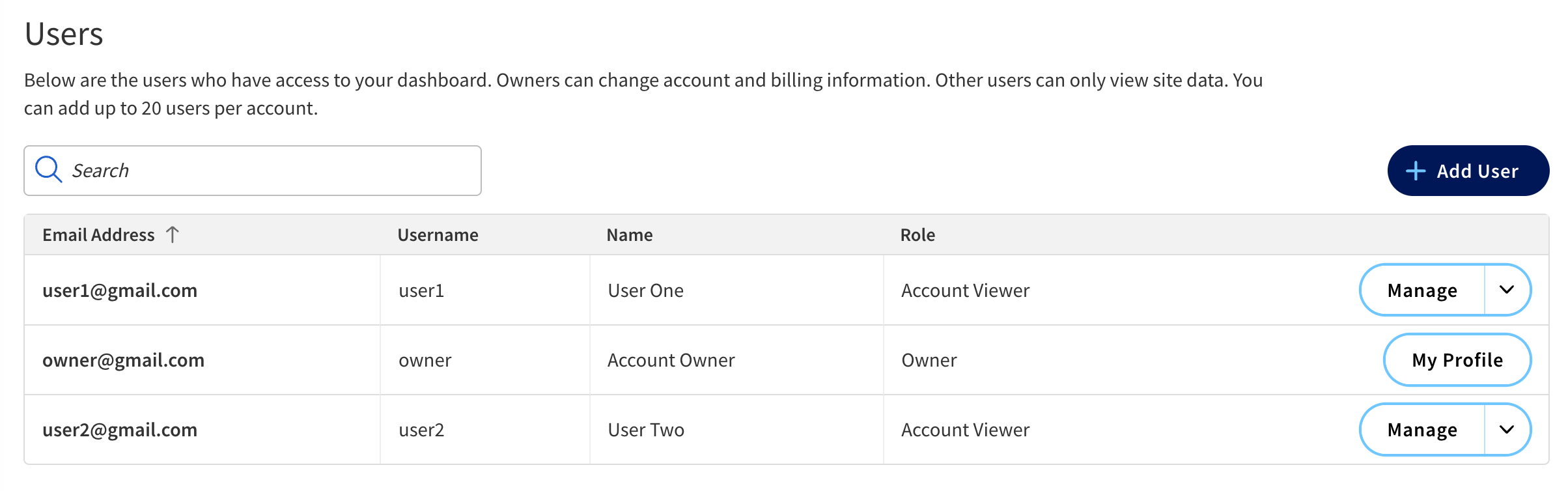
The main content area features a table listing individual users with the following information.
| Field | Description |
|---|---|
Email Address |
The email address of the user. |
Username |
The user’s username. |
Name |
The full name of the user. |
Role |
Indicates the user’s role (Owner or Account Viewer). |