Identity Authority
IdAuthority is the data infrastructure to verify website identities for SSL and S/MIME certificates. Sectigo offers free registration in IdAuthority. Registration initiates a validation process.
Access IdAuthority
-
Log in to the Sectigo Partner Portal.
-
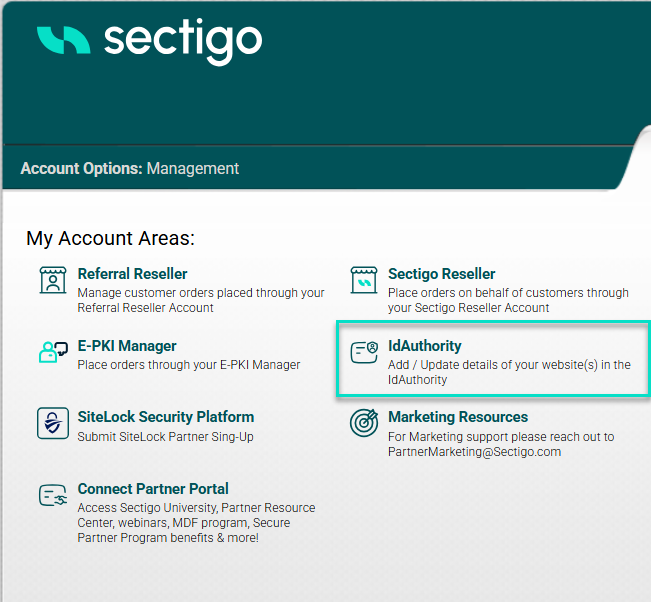
Click IdAuthority in the My Account Areas section.
-
Review the IdAuthority page, which contains two main sections:
-
Website Options
-
Company Details
-
Manage IdAuthority
Website Options
Website Options in IdAuthority are divided into two sections:
-
Your Websites — This section displays websites that customers have already registered where they can be edited. These sites can have Valid or Awaiting Validation statuses.
-
Register another Website — This section allows customers to register additional websites.
Options with existing website
To edit an existing website:
-
Click Edit to update the credentials for the website.
-
Click Apply Changes after you finish editing.
-
Click Cancel to discard changes.
-
Click Set as Primary for the website you want to designate as primary. The Primary Site column will indicate your selection.
To revalidate or reissue the IdAuthority for a website:
-
Click Revalidate DCV in the S/MIME Domain Validation column to revalidate the domain control validation for S/MIME.
-
Click Reissue in the S/MIME Domain Validation column to reissue the previously issued IdAuthority.
Register another Website
To register another website:
-
Enter the website URL in the Location of Website field.
-
Click Register Website.
-
In the Domain Control Validation: Change Email Address or DCV method popup window select the available email-based DCV method.
Starting June 15, 2025, WHOIS-based email addresses cannot be used for domain validation, and previously completed validations using WHOIS email addresses cannot be reused. For more information, see Domain Control Validation.
The new website will appear in the Your Websites list with the Awaiting Validation status.
In order to be able to use the new website for certificate issuance, you must complete domain control validation (DCV) for the new website. Follow the instructions in the Sectigo email to complete the DCV process.
Company Details
Company Details section allows you to view and edit your company details.
-
Click Company Details
In the open window you can change the following information:
Category Details Registered Address
Company name, department, street address, city, state/province/county, postal/ZIP code, and country.
VAT Details
VAT status and VAT number.
Admin Contact (Personal Details)
Title, first name, surname, email address, phone number, and fax number.
Billing Contact
Personal details.
Business Information
Business description and trading address.
Additional Company Details
DUNS number and company registration number.
Admin Contact (Company Details)
Company information for the administrative contact.
Organizational Contact
Company information for the organizational contact.
Financial Interest Resources
Ticker symbol, stock market information, financial information URL, accounts year-end date, management biographies URL, references URL, and Identrus enabled status.
-
Click Apply Changes to save, or click Cancel to discard changes.
For other changes, email [email protected] from your corporate email address.