Overview
Sectigo Connector for Avi Load Balancer (formerly Avi Vantage) is a solution that automatically enrolls, imports, and renews public and private Sectigo SSL/TLS certificates on the Avi Load Balancer platform. This guide covers topics related to the installation of the connector, certificate enrollment, renewal and revocation. It is intended for security administrators who manage the Avi Load Balancer platform for an organization.
The Avi Load Balancer platform — previously known as Avi Vantage, and later as VMware NSX Advanced Load Balancer, now part of Broadcom — is a software-based load balancer that provides multi-cloud application services such as load balancing, SSL offloading, application security, autoscaling, container networking, and a web application firewall. It automates application delivery to ensure applications are available, secure, and responsive.
The connector interacts with Sectigo Certificate Manager (SCM) to provision and renew certificates. SCM is a universal platform purpose-built to issue and manage the lifecycles of public and private digital certificates. The platform secures every human and machine identity across the enterprise.
The following certificate types are supported:
-
Domain Validation (DV): Single-domain, multi-domain, and wildcard certificates issued by Sectigo
-
Organization Validation (OV): Single-domain, multi-domain, and wildcard certificates issued by Sectigo or a third-party CA
-
Extended Validation (EV): Single-domain and multi-domain certificates issued by Sectigo or a third-party CA
-
Private SSL: Private SSL certificates issued by Sectigo or a third-party CA for internal use
For more information on SCM’s supported third-party CAs, see Understanding CA backends.
Architecture
SCM and the Avi Load Balancer platform are integrated using the SCM REST API and Avi Load Balancer Controller API through a script to facilitate certificate management. The script can be installed on the Avi Load Balancer platform either through the Avi UI or by executing an installation script from a remote machine.
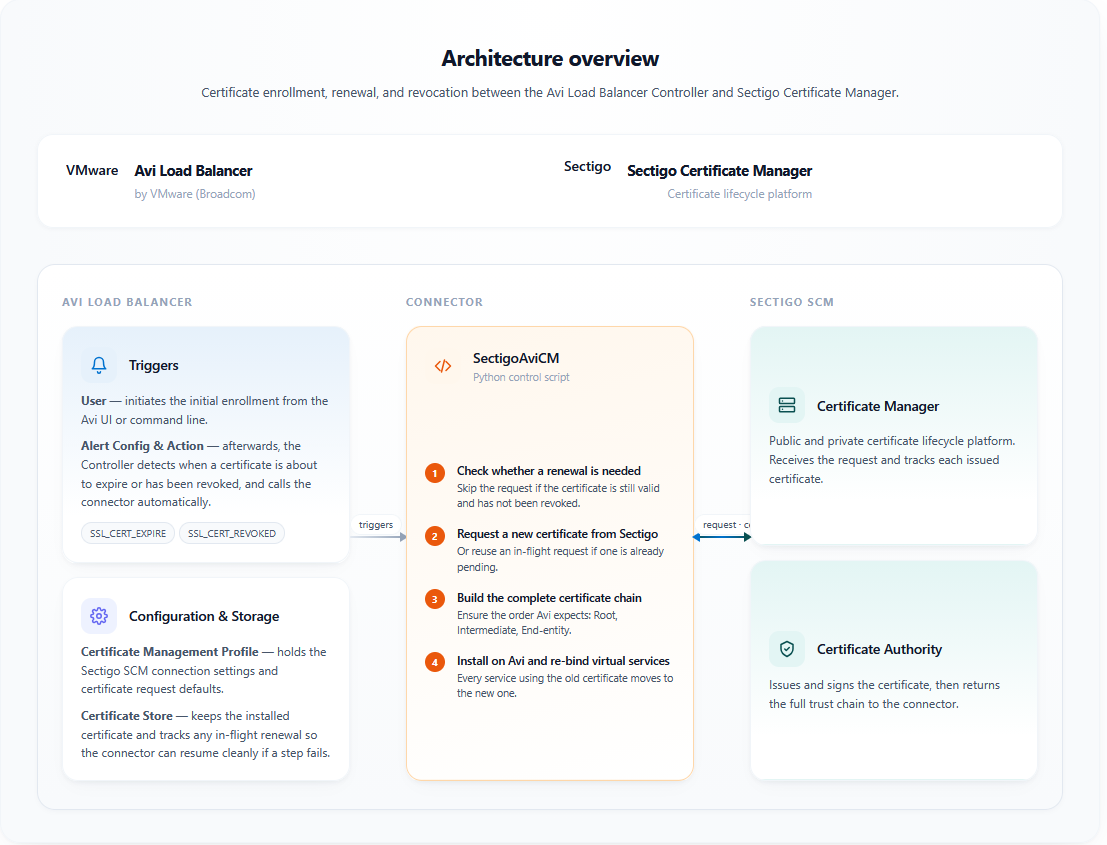
Workflow
The script executes the following workflow for certificate management on the Avi Load Balancer platform:
-
Connects to the Avi Controller via the REST API to authenticate the Avi Controller using valid credentials.
-
Verifies the renewal is actually required by checking the certificate’s revocation and expiry status. If neither applies, the connector exits without contacting Sectigo. This prevents repeated API calls when the Controller re-fires the alert (every 15 seconds by default).
-
Checks for a pending Sectigo certificate request already stored on the Avi certificate from a previous failed attempt. If one is found, reuses it instead of issuing a duplicate.
-
Generates a key pair and certificate signing request (CSR).
We recommend you use the 2048-bit key size for RSA or secp256r1 for ECDSA. -
Submits the CSR to Sectigo SCM.
-
Once issued, resolves the issuing CA on the Controller and imports the certificate together with the full chain in the order Avi expects: Root > Intermediate(s) > End-entity.
Package contents
The connector package is distributed as SectigoAviCM-<YY.MM.PP>.zip, where YY.MM is the year and month of the release and PP is the patch number for that release line.
The installation package contains the following files:
-
config.json: This file includes the configuration parameters that contain the Avi Load Balancer server parameters and SCM credentials.
If you don’t want to provide the user passwords in the
config.jsonfile for security reasons, set the value to an empty string (""). Thedeploy.shscript will request the password value during deployment. -
deploy.sh: This script gets the configuration parameters from the
config.jsonfile and deploys the connector to Avi Load Balancer. -
destroy.sh: This script removes the connector from Avi Load Balancer.
Before using this script, ensure that all certificates are unassigned from applications and removed from the profile. -
enroll.sh: This script enrolls a certificate in SCM.
-
SCM Client EULA v1.0.1.txt: The EULA agreement. You need to accept it when running
deploy.shfor the first time. -
sectigo_avi_cm_script.py: This script uploads the provisioned certificate to Avi Load Balancer.