Configuring the ACME client
Extract the files
Extract the contents of the zip file to a directory of your choice. You will find the following files inside the package:
-
spacme(orspacme.exe): The main command-line interface tool. -
config.yaml: The starter configuration file where you define your certificates. -
.env: A convenient place to set environment variables. -
examples/: Contains example configurations for advanced use cases (for example, multi-account setups). -
README.html: An offline, easy-to-read version of the README documentation. -
EULA.txt: The End User License Agreement.
Configure the ACME client
Get DNS credentials
-
Navigate to lego.
-
Under DNS Providers, select your DNS provider (for example, IONOS)
-
Follow the on-screen instructions and links (if any) to the DNS provider’s documentation.
Retrieve the following values. You will need them to edit the config file.
-
the provider’s code
-
provider-specific environment variable names and values
-
| Each DNS provider is different. They may have different numbers of variables and specific methods for retrieving the information. |
Edit the config file
-
From the package, copy the config file to your text editor.
-
Edit
config.yamlto configure certificate, ACME, and DNS details, referring to the following table.Parameter Definition common_nameYour domain name.
san_domainsOptional. The list of SAN domains (
common_nameincluded automatically)acme_serverACME server URL, provided by the certificate authority. For example, "https://acme.sectigo.com".
acme_eab_idYour ACME EAB ID, provided by the certificate authority.
acme_eab_keyYour ACME EAB key, provided by the certificate authority.
acme_eab_hmacYour ACME HMAC key, provided by the certificate authority.
contact_emailThe email that should receive expiry/revocation notifications.
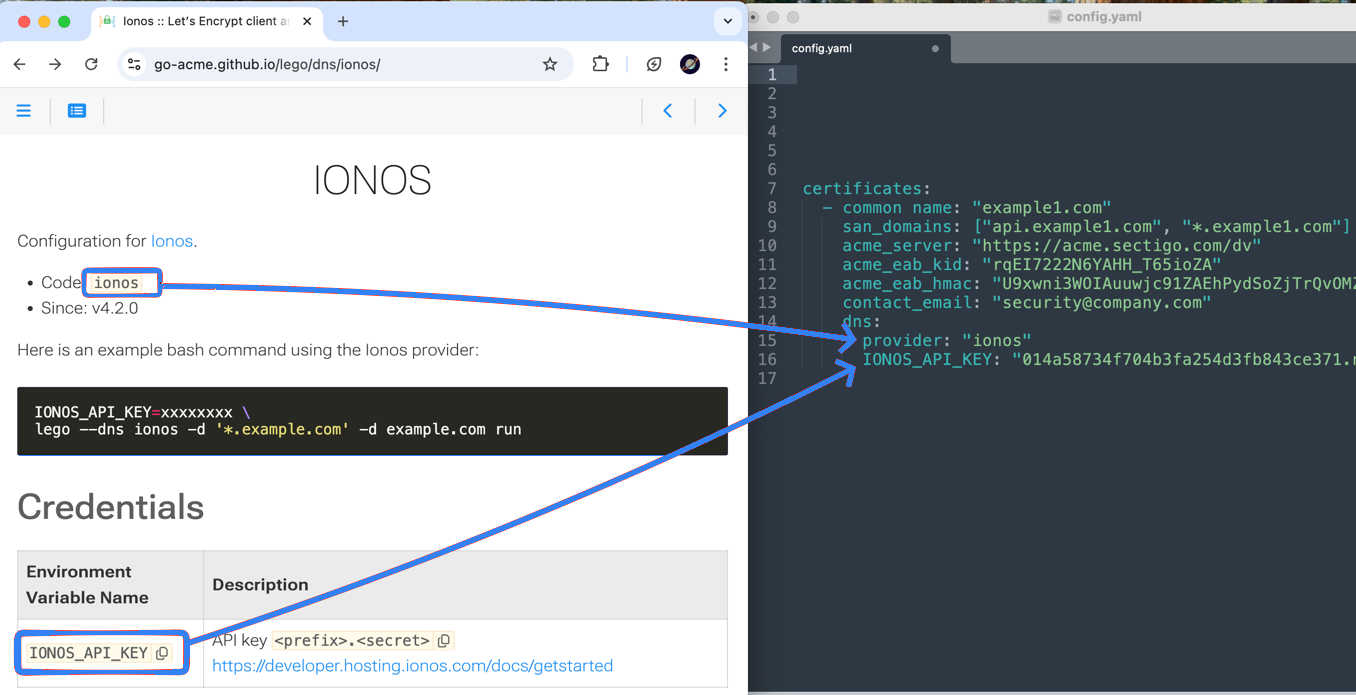
providerCopied from the Code field on the DNS Provider page on Lego (in this example, "ionos").
Provider-specific variables. For example,
IONOS_API_KEYCopied from the Environment Variable Name table on the DNS Provider page on Lego (in this example, follow the link to retrieve API key "014a58734f70…").
Example config.yamlcertificates: - common_name: "example1.com" san_domains: [ "*.example1.com", "api.example1.com"] acme_server: "https://acme.sectigo.com/dv" acme_eab_kid: "rqEI7222N6YAHH_T65ioZA" acme_eab_hmac: "U9xwni3WOIAuuwjc91ZAEhPydSoZjTrQvOMZVvgqqQ8HM3gPYe3iCKhwsC1zLiTZ9pb5vTAfnP4IHCVRX0y6XA" contact_email: "[email protected]" dns: provider: "ionos" IONOS_API_KEY: "014a58734f704b3fa254d3fb843ce371.nMiGBa0VK8EjbjImCvsQF9xPYKzlaHTKco9ix5j0InoBv8RxJpdlY_A3hEnk67ZiBrcVblNzeMdkLFTNiqjULg"You can also provide credentials by exporting them as environment variables or by putting them in the .envfile.
Validate the config file
Before processing, you can validate your configuration for syntax errors.
-
Linux/mac:
./spacme validate -
Windows:
spacme.exe validate
Separate secrets from config (optional)
You might want to remove secrets from config.yaml to track it in version control.
The config file supports environment variable substitution.
For example, if you have the following environment variables:
ACME_EAB_HMAC=abc123
DEPARTMENT=infosec
Then you can use the ${VAR} syntax in config.yaml:
acme_eab_hmac: "${ACME_EAB_HMAC}" # will be abc123

contact_email: "${DEPARTMENT}@company.com" # will be [email protected]
Config file reference
This table lists all supported configuration fields.
For more details on how to use them, see the examples/ directory.
| Field | Level | Default | Description |
|---|---|---|---|
|
Global |
- |
Default email address for ACME notifications. |
|
Global |
|
Default key type. Supported: |
|
Global |
|
Default number of days before expiration to renew. |
|
Global |
|
Default behavior for renewal if OCSP check fails. |
|
Global |
- |
Dictionary of reusable ACME account profiles. |
|
ACME |
- |
ACME server directory URL. |
|
ACME |
- |
External Account Binding (EAB) Key ID. |
|
ACME |
- |
External Account Binding (EAB) HMAC. |
|
ACME |
|
Skip TLS verification for the ACME server. |
|
Global |
- |
Dictionary of reusable DNS provider configurations. |
|
Global |
- |
DNS provider alias to be referenced by certificates. |
|
Global |
- |
DNS provider specific settings. |
|
Global |
- |
List of certificate configurations to manage. |
|
Cert |
|
Unique name for the certificate storage. |
|
Cert |
- |
Required. Primary domain name. |
|
Cert |
- |
List of additional domain names (SANs). |
|
Cert |
Global |
Overrides global |
|
Cert |
|
Reference to |
|
Cert |
- |
Ad-hoc ACME server URL (if |
|
Cert |
- |
Ad-hoc EAB Key ID. |
|
Cert |
- |
Ad-hoc EAB HMAC. |
|
Cert |
|
Ad-hoc skip ACME server TLS verification. |
|
Cert |
- |
Reference to |
|
Cert |
- |
Ad-hoc DNS provider config (must include |
|
Cert |
Global |
Overrides global |
|
Cert |
Global |
Overrides global |
|
Cert |
Global |
Overrides global |